
App Acceptance Checklist: What to Review Before Final Payment
Review an outsourced app before final acceptance: agreed outcomes, customer and operator journeys, failure cases, account access, handover files, release status and open issues.
When an app is delivered, review whether people can complete the work you agreed it would support. A demonstration is useful, and recorded checks by the client, operator and development team make the outcome easier to assess. This is a technical acceptance guide; sign-off and payment milestones must be read alongside your contract, quotation and agreed changes.
1 Agree on the version and the expected outcomes
Before testing, record the app version and build number, backend environment, test accounts and supported device range. If a new build arrives during the review, note which checks need repeating. A demonstration on one build and client testing on another can produce different results.
Bring the contract, quotation and approved scope changes together. Next to each included feature, write an observable completion outcome. For example, replace a vague item such as booking functionality with a specific check: after a customer cancels a booking, both the customer and staff views show it as cancelled.
The GOV.UK guide to user stories describes acceptance criteria as outcomes used to check that a service meets a user need. This is a useful method for agreeing on evidence, not a rule imposed on every private app contract.
Separate included work, excluded work and open scope decisions. If the project is still at the planning stage, use the app development brief checklist to identify users and their core journey first.
2 Follow one task through the customer and staff views
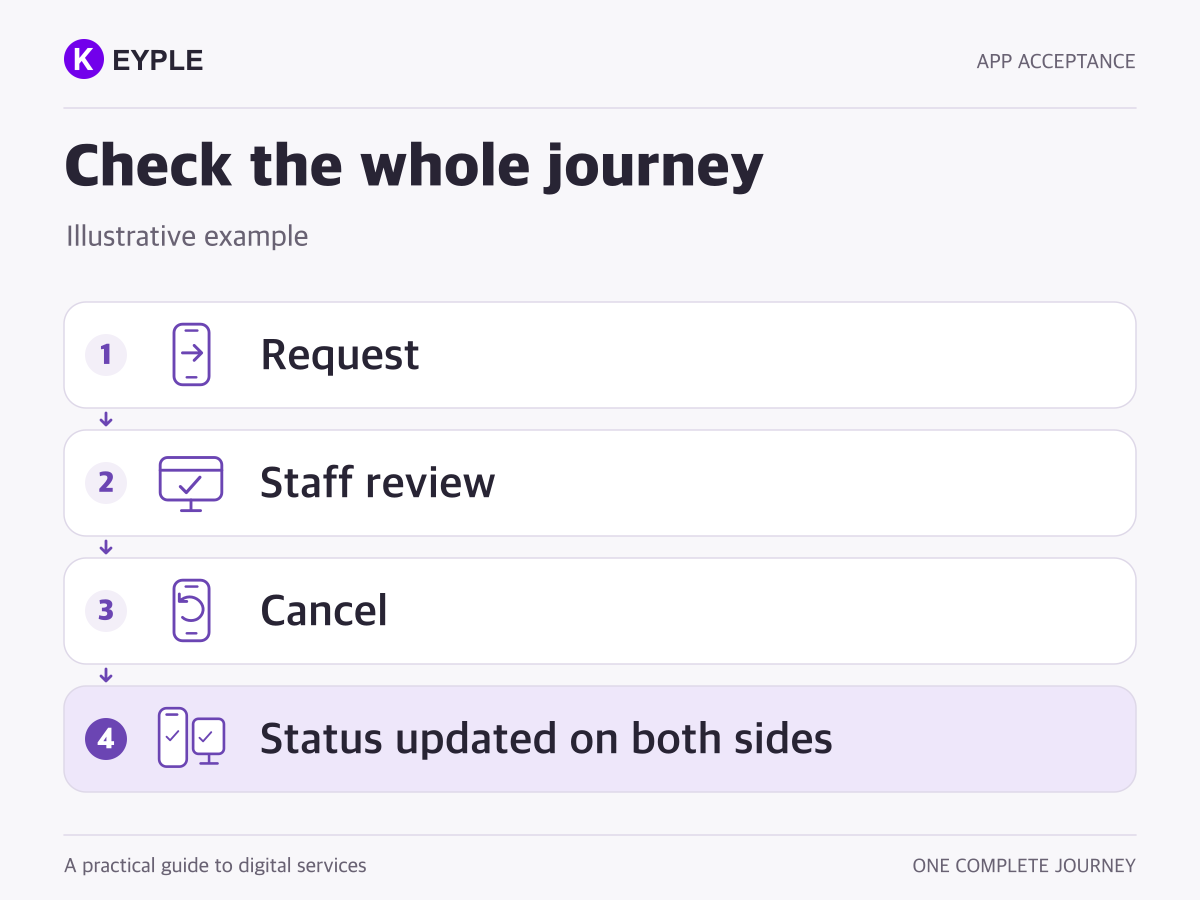
Consider an illustrative booking service, with cancellation included in the agreed scope. This is a hypothetical example, not a report of results from a client project.
- A test customer selects an available time and requests a booking.
- A staff member signs in with their own account and confirms it.
- The customer sees the confirmation for the same booking.
- The customer requests a cancellation, which follows the agreed process.
- Both people reopen their screens and see the same cancelled status.
Check the saved outcome as well as the success message. A completed screen without a corresponding staff record, or a status that reverts after refresh, needs a reproducible issue report. If updates are intentionally delayed, agree on the expected delay and what the user should see while waiting.
Then cover relevant variations with the development team: competing requests for the same slot, retries during processing and access from an account that should not have permission. A hidden button does not prove access is restricted. The team should verify enforcement where data is processed, while the client reviews expected results with role-specific test accounts.
Ask the person who will operate the service to finish a normal work task, such as finding today's requests, cancelling a booking or checking its status for a customer inquiry. See admin panel scope and acceptance criteria for a closer look at operating tasks and permissions.
3 Include real devices and interrupted journeys
Agree on the supported iOS and Android devices and operating system versions, then check them on physical devices. A successful test on the client's everyday phone does not establish coverage of the full supported range. Select applicable checks and divide technical verification with the development team.
- Input and layout: Missing or invalid input should lead to useful guidance. Check that the keyboard and larger text settings do not hide essential controls or instructions.
- Permissions: Review what happens when notification or photo access is declined. Features that do not require that permission should behave as agreed.
- Network and retries: A failed request should not be reported as successful. Check that retrying does not create duplicate bookings or orders.
- Interruption and return: Leave a screen or switch apps, then return. Compare the preserved or recovered state with the intended behavior.
- Updates: For an existing app, test an upgrade with existing user data separately from a fresh installation.
Android's core app quality guidelines provide a reference for reviewing layout, state, permissions and stability. Passing selected checks does not guarantee quality on every device or under every condition.
Use prepared test accounts and data. Agree on the environment and method for payments, refunds, account deletion and data resets before testing anything that could affect money or information. Google Play's billing test guidance notes that purchases on test tracks incur real charges unless the user is a license tester. Confirm the billing setup separately.
Client journey checks do not replace code review, security assessment or load testing. If those activities are included in the agreement, request their scope, method, findings and unresolved risks as part of the evidence.
4 Verify access as well as delivery of files
For each agreed handover item, record its location, owner, version and access method. Delivery and usage rights for source code, design files and third-party assets depend on the agreement and applicable asset terms. Receiving a file alone does not establish the full rights available to you.
- Identify the repository version corresponding to the app you reviewed.
- Check that the next maintainer has the environment instructions needed to run and build it.
- Confirm that the client and operators can perform their tasks using their own accounts.
- Identify who manages and pays for the backend, domain, stores and external services.
- Record post-release support contacts and the agreed support scope.
Do not place passwords or secret keys in the acceptance sheet. Use account invitations, roles and the agreed secure delivery process; record how access works and who is responsible. Avoid removing the outgoing maintainer's access before replacement access and release paths have been checked.
Use the app development handover checklist for the detailed technical review. The client can verify access and operating tasks while the technical maintainer checks that running and building the agreed version can be reproduced.
5 Distinguish testing, store review and public availability
If release work is included, make the current state explicit. A test distribution, a review submission, an approval and availability to ordinary users are separate milestones.
Apple's release-option guidance allows options such as manual or automatic release after approval. Approval alone therefore does not prove that customers can install the app. Google Play's testing guidance also describes test tracks separately from production release.
Record the target version, current state, intended countries and devices, remaining actions and owner for each platform. If public release is the agreed milestone, check the store link and installation of that version in the target environment. Do not record access through a test invitation as a public launch.
Clarify whether the delivery scope ends at review submission or also includes responding to rejection and completing release. When review is pending, distinguish actions the team can take from decisions that depend on the platform. Review timing and approval outcomes are not milestones a development team can unconditionally guarantee.
6 Keep open issues and retest evidence visible
Give each check a clear status: passed, unresolved or not yet verified. Record enough evidence to distinguish looking at a feature from confirming the agreed result.
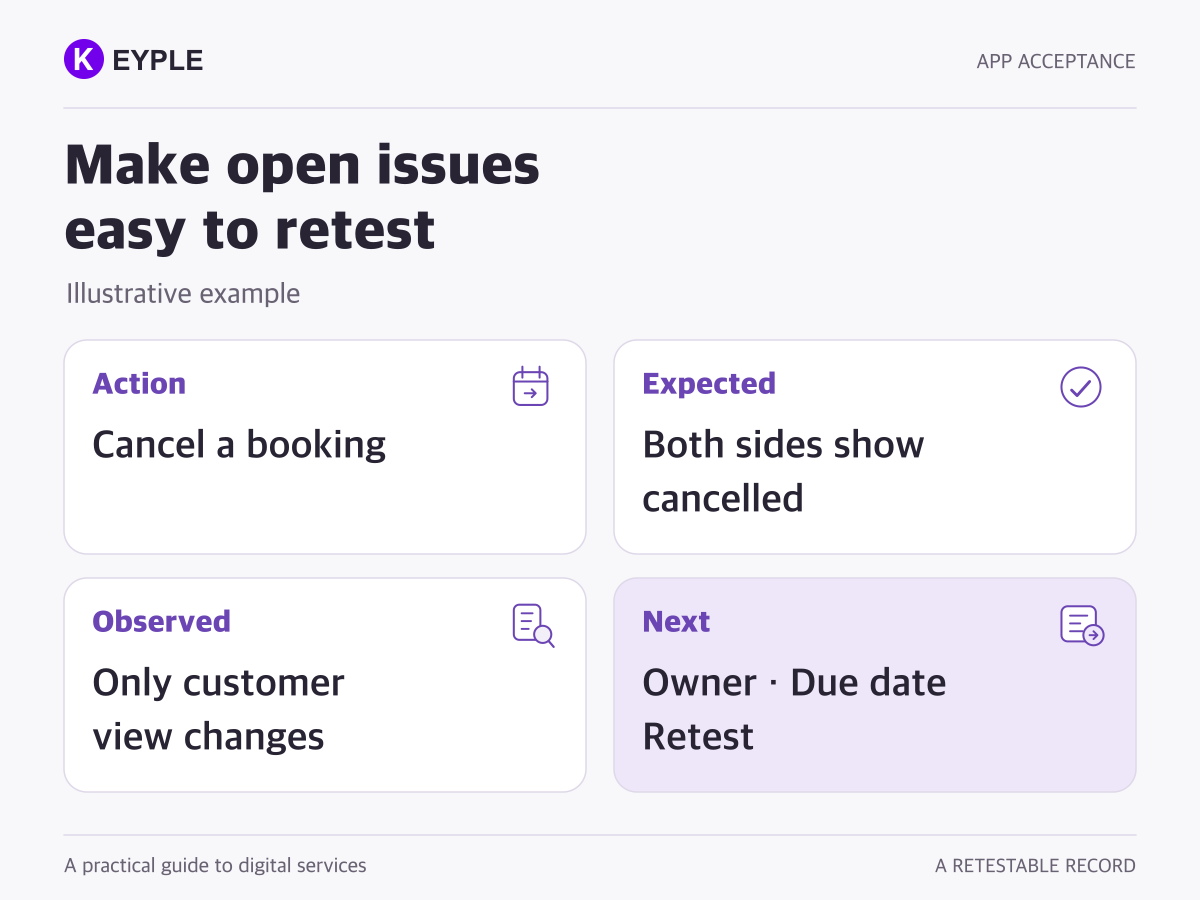
For the hypothetical cancellation issue, a useful entry might include:
- Environment: Android test device, review build 1.0.0, customer account A
- Steps: Open bookings, select a booking, cancel it, reopen the staff list
- Expected: Both customer and staff views show cancelled
- Observed: Only the customer view changes; staff still see an active booking
- Follow-up: Owner, target fix date, build to retest and person responsible for checking
Use test data for screenshots or short recordings, and check that real customer information is not exposed. After a fix, repeat the same steps and update the result. Agree with the team on related journeys that should also be checked for unintended effects.
Prioritize by impact and urgency. Exposure of another user's information, duplicate charges or lost data calls for prompt discussion and response. A wording issue still needs an owner and a completion check. Distinguish defects against agreed behavior from new feature requests and changes required by external services, then connect each item to the appropriate scope, cost and schedule discussion.
The final record should bring together the reviewed version, passed checks, open items, follow-up conditions and agreed acceptance and payment milestones. An open issue does not automatically establish a right to withhold payment, and a particular bug count does not automatically establish that payment is due. Read the contract process alongside the actual findings.
KEYPLE develops and operates its own apps and games, and also builds apps and websites for clients. Review our app development service and describe your core user journey and desired completion outcome when discussing a project. For changes to an app you already operate, see our Flutter app maintenance service.
Frequently asked questions
Can a non-developer review an outsourced app?
Yes. You can use test accounts to complete agreed customer and staff journeys and record the outcomes. Code, security and performance assessment require separate technical verification. Ask the development team or a qualified reviewer to explain the scope and evidence for those checks.
Does store approval mean the project has passed acceptance?
Store review and project acceptance have different purposes. Review the agreed features, operating tasks and handover separately. If public release is included, also check that the intended version can be installed in the agreed countries and on supported devices.
Can I withhold final payment if bugs remain?
This checklist cannot determine whether payment is due. Check the contract and approved changes for payment milestones, acceptance periods and defect procedures. Document each issue's impact, reproduction steps, owner and target date, then clarify the acceptance and payment conditions with the other party.
How is acceptance different from handover?
Acceptance checks whether agreed outcomes have been delivered. Handover provides the material and access the next maintainer needs to operate and change the service. Both may be part of a project's completion criteria, so review the functional results alongside the relevant files and access.